
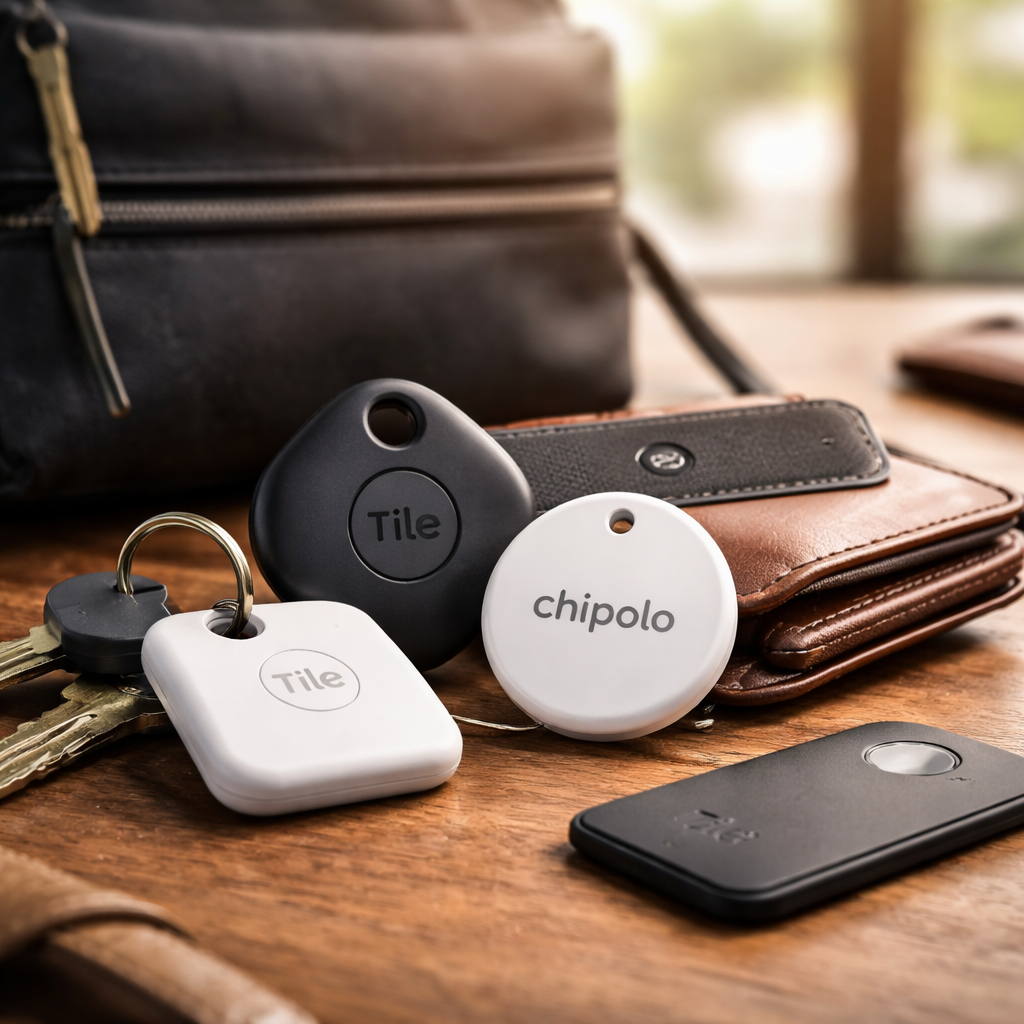
Losing your keys, wallet, or bag is frustrating enough — but what makes it worse is the feeling that you had no way to prevent it. Apple’s AirTag solved that problem for millions of iPhone users, but it left everyone else looking for a solid alternative to AirTag that actually works without locking you into one ecosystem.
Why the tracker market goes well beyond Apple
AirTag relies entirely on the Find My network, which means it works best — and sometimes only properly — when you’re using an iPhone. Android users, people with mixed-device households, or those who simply want more flexibility in features have real reasons to look elsewhere. The good news is that the Bluetooth tracker space has matured significantly, and there are devices today that match or even outperform AirTag in specific scenarios.
What matters when choosing a tracker isn’t just the hardware — it’s the network behind it, the app experience, the battery life, and whether the device fits physically into your life. A tracker that’s perfect for a backpack might be completely wrong for a bike or a pet collar.
The strongest contenders worth your attention
Several brands have built reliable tracking ecosystems that compete directly with Apple’s offering. Here’s how the most popular options compare on the features that actually matter day to day.
| Device | Platform compatibility | Network size | Battery life | Best for |
|---|---|---|---|---|
| Samsung SmartTag2 | Android (Galaxy) | Samsung SmartThings | Up to 6 months | Samsung device users |
| Tile Mate | iOS & Android | Tile community network | Up to 3 years | Cross-platform users |
| Tile Pro | iOS & Android | Tile community network | Up to 1 year | Louder alert, longer range |
| Chipolo ONE | iOS & Android | Chipolo community | Up to 2 years | Key finders, minimalist use |
| Chipolo ONE Point | Android (Google) | Google Find My Device | Up to 2 years | Android-first users |
Each of these devices solves the same core problem from a slightly different angle. The right choice depends heavily on which smartphone platform you use and how large a crowd-sourced network you need behind your tracker.
Tile: the cross-platform veteran
Tile has been in the tracking space longer than most competitors, and that history shows in the size of its community network. When your tagged item goes missing, any Tile user who passes nearby anonymously pings its location to you — and Tile’s user base is genuinely large enough for this to be useful in most urban areas.
Tile offers several form factors: the flat Slim that slides into a wallet, the Mate for keys and bags, and the Pro for those who want louder alerts and a slightly longer Bluetooth range of around 120 meters. The replaceable battery in some models is a practical advantage over AirTag’s non-replaceable CR2032 design, though AirTag does use a standard coin cell that’s easy to find.
Tile’s biggest strength is platform neutrality. It doesn’t care whether you’re on iPhone or Android, and its app works consistently across both operating systems without degraded functionality.
Samsung SmartTag2: the Android answer to AirTag
If your household runs on Samsung Galaxy devices, the SmartTag2 is arguably the most polished tracking experience available outside of Apple’s ecosystem. It connects to the SmartThings network and benefits from Ultra-Wideband (UWB) precision finding on compatible Samsung phones — the same technology Apple uses in AirTag for its Precision Finding feature.
The SmartTag2 also has a useful feature that AirTag lacks: you can press the button on the tag to make your phone ring, which is genuinely handy when you’ve lost your phone rather than your keys. Battery life of up to six months is competitive, and the device has an IP67 rating for water and dust resistance.
The limitation is obvious — the SmartThings network is smaller than Apple’s Find My network, and the tracker performs less impressively outside of densely populated areas or places where Samsung phones are common.
Chipolo: compact, loud, and surprisingly capable
Chipolo trackers have built a reputation for one specific thing: loudness. The Chipolo ONE produces an alert of up to 120 dB, which is louder than both AirTag and most Tile models. If you regularly lose things inside your own home — between couch cushions, under beds, buried in bags — that extra volume makes a real difference.
The Chipolo ONE Point integrates with Google’s Find My Device network, making it a natural fit for Android users who want the same kind of broad crowd-sourced coverage that iPhone users get with AirTag. As Google’s network continues to grow, this becomes an increasingly attractive option.
Practical tip: If you’re an Android user deciding between Chipolo ONE Point and Tile, consider your city. Tile’s network tends to be denser in North America, while Google’s Find My Device network is growing fastest globally. Check which tracker community is larger in your region before committing.
Features that often get overlooked during the buying decision
Most buyers compare trackers on range and battery life, but a few less-discussed features can make a bigger difference in daily use.
- Anti-stalking alerts: AirTag introduced automatic alerts when an unknown tag travels with you. Tile, Samsung, and Chipolo have added similar protections, but implementation varies — check whether the app you’ll use notifies you reliably.
- Water resistance rating: IP67 means submersion to one meter for 30 minutes. Not all trackers carry this rating, and it matters if you attach one to outdoor gear, pet collars, or sports equipment.
- Form factor and attachment: Some trackers only work with a keyring hole. If you need to slip one into a wallet slot, a flat Tile Slim is practical; a standard round tracker is not.
- Replaceable versus rechargeable battery: Rechargeable sounds convenient but can mean the tracker is dead when you most need it. Replaceable coin cells can be swapped anywhere in minutes.
- Crowd network transparency: Larger networks mean better coverage in unfamiliar locations. Smaller, proprietary networks are more reliable only in areas where that brand is popular.
How to match a tracker to your actual habits
The tracking device that works best for you isn’t necessarily the one with the highest specs — it’s the one that fits seamlessly into how you move through the world. Someone who commutes through a major city will benefit far more from a large crowd network than someone who lives rurally, where any community-based location feature becomes unreliable regardless of brand.
Think about what you’re tracking and where. Keys and wallets stay close to you most of the time, so the real use case is finding them quickly inside a home or bag — range and network size matter less there, and alert volume matters more. Luggage, bikes, or equipment that could genuinely go missing in an unfamiliar location is where network coverage becomes critical.
It’s also worth noting that using multiple trackers from different brands on different items is completely valid. You don’t have to commit to a single ecosystem for all your tagged belongings. Many people use Tile for their keys, a Samsung tag on a travel bag, and a Chipolo on a pet collar — each chosen for that specific use case rather than brand loyalty.
The decision comes down to your phone, your city, and your stuff
There is no universally best tracker once you step outside the Apple ecosystem. What exists instead is a range of well-built, genuinely useful devices that each make more sense in specific contexts. Android users with Samsung phones have a strong native option. Cross-platform households get the most flexibility from Tile. Android users who want the broadest possible global network should watch Chipolo ONE Point as Google’s Find My Device infrastructure keeps expanding.
The one thing that’s clear across all these options: the technology has improved enough that not owning an iPhone is no longer a reason to go without reliable item tracking. The alternatives are real, they work, and for many users they’ll be a better fit than AirTag ever could have been.